Abandoned Cart Emails and Recovery for Shopify & WooCommerce
By Kanishak Sharma, Adflipr

From abandoned cart to recovered order.
Abandoned cart recovery is the process of automatically contacting shoppers who added products to their cart but didn't complete the purchase, by email, WhatsApp or web push, to bring them back to finish the order. On Shopify, recovery can start with the built-in abandoned checkout email in the Shopify Messaging app. On WooCommerce, recovery needs an extension or plugin. A typical setup sends two or three messages, starting 30-60 minutes after the shopper leaves, and stops as soon as the shopper buys.
Recovery matters because most carts never become orders: Baymard Institute averages 50 studies to a documented cart abandonment rate of 70.22%. Some of those shoppers were never going to buy. Many got distracted, wanted to compare, or hit a surprise at checkout.
This guide is published by Adflipr, an ecommerce marketing automation platform for Shopify and WooCommerce stores.
What Is Abandoned Cart Recovery?
Abandoned cart recovery is an automated follow-up that reminds shoppers about the products they left in their cart or checkout and links them back to finish the purchase. It's usually a short email sequence, sometimes combined with WhatsApp or web push messages.
Key definitions:
- Cart abandonment means a shopper adds products to the cart and leaves before starting checkout.
- Checkout abandonment means a shopper starts checkout, usually enters an email address, and leaves before paying.
- Recovery automation means a workflow that detects the abandoned cart, waits, sends a reminder, checks for a purchase and sends follow-ups, without anyone on your team doing it by hand.
- A known shopper is one who has given you an email address or phone number, at checkout, through a signup form or by logging in. An unknown shopper hasn't.
An abandoned cart recovery workflow typically consists of five parts: a trigger, a waiting period, a recovery message, a purchase check and a follow-up. The trigger fires when the cart has been idle for a set time. Shopify's legacy checkout experience, for example, counts a checkout as abandoned once it stays incomplete for more than ten minutes after the customer entered their email (Shopify Help Center).
What Is Cart Abandonment and Why Does It Happen?
Cart abandonment is when a shopper adds products to their cart and leaves without buying. Checkout abandonment is the narrower case where they started checkout and left before paying. Customers abandon carts mainly because they were only browsing, or because something at checkout put them off: extra costs, slow delivery, low trust or a forced account. In Baymard Institute's survey of US online shoppers, 42% had abandoned a cart because they were "just browsing / not ready to buy". Among the other reasons, the most common were extra costs being too high (40%), slow delivery (20%), not trusting the site with card details (19%) and being asked to create an account (18%) (Baymard Institute).
What each reason means for your store:
- Unexpected shipping costs, taxes or fees. Show them on the product or cart page, not first at the last step.
- Lack of trust. Reviews, a clear returns policy and visible contact details help, before checkout and in the reminder.
- Forced account creation. Offer guest checkout and invite account creation after the order.
- A complicated checkout. Baymard's benchmark puts the average US checkout at 23.48 form elements shown by default, against an ideal of 12-14.
- Just browsing. A light reminder is fine; a heavy discount sequence mostly gives margin away.
Recommendation: reminders work best on the fixable reasons. If surprise shipping costs drive most of your abandonment, fix the cart page first, then write the emails.
How Does Abandoned Cart Recovery Work?
Abandoned cart recovery works by tracking a known shopper's cart, detecting when it's left idle, waiting, sending a reminder with a link back to the saved cart, and checking for a purchase before every follow-up. The basic logic is the same on every platform:
ADD TO CART
    ↓
CUSTOMER LEAVES
    ↓
ABANDONMENT DETECTED
    ↓
WAIT
    ↓
EMAIL / MESSAGE
    ↓
CHECK PURCHASE
    ↓
FOLLOW-UP (only if still not purchased)
    ↓
END
The wait gives people time to finish on their own, and the purchase check is what separates a helpful reminder from an embarrassing one.
Known vs unknown shoppers: who can you actually recover?
Recovery depends on what the shopper has shared with you, not on the tool. This framework shows what's possible at each level:
| Shopper state | What you have | Recovery possible |
|---|---|---|
| Anonymous visitor | Nothing | No messages. Capture an email earlier with a signup form or an email-first checkout |
| Visitor who allowed browser notifications | A push subscription | Web push reminder |
| Shopper who typed an email at checkout or subscribed | Email address | Email sequence |
| Shopper with email and WhatsApp opt-in | Email and phone, with consent | Email sequence plus one WhatsApp reminder |
| Logged-in customer | Account and order history | Cart tracked from add to cart; messages can reflect past orders |
Recommendation: the biggest gains often come from moving shoppers up this table, for example by asking for the email as the first checkout field, rather than from rewriting the emails.
How Do I Recover Abandoned Carts on Shopify?
To recover abandoned carts on Shopify, turn on the "Abandoned checkout emails by Shopify" automation in the Shopify Messaging app. It emails customers who entered their email at checkout and didn't pay, after a delay you choose. For multi-step sequences, segmentation or extra channels, add a marketing automation app and turn off Shopify's own email so shoppers don't get two reminders.
What the Shopify Help Center documents:
- Who is covered. A checkout counts as abandoned when the customer entered an email and didn't pay. If a customer uses a phone number instead, no recovery email can be sent. Recovery covers the Online Store and Buy Button channels, not POS or third-party channels.
- Purchase suppression. If the customer buys before the email goes out, it isn't sent. It's also skipped when payment failed or nothing in the cart can be bought.
- Reporting and retention. The Abandoned checkouts emails report shows orders and sales from the reminders. Abandoned checkouts older than three months are deleted.
Shopify Messaging covers email, SMS and WhatsApp, and its App Store listing says the first 10,000 emails each month are free (checked October 2026).
Example: a store sells $20 phone cases and $300 headphones. Shopify's single reminder treats both carts the same. A store that wants a reassurance-led second email for the headphones, or a WhatsApp reminder alongside the email, needs a workflow tool.
Recommendation: start with Shopify's built-in email if you're new. Move to a workflow tool when you need more than one message or different paths for different carts. Adflipr for Shopify is one option: a Shopify App Store app that brings products, coupons and customers into Adflipr's flow builder, so each recovery email shows the shopper's actual items.
How Do I Recover Abandoned Carts on WooCommerce?
To recover abandoned carts on WooCommerce, install an extension or plugin, because WooCommerce core doesn't send abandoned cart emails. Options include WooCommerce's official AutomateWoo extension and plugins from email marketing platforms such as Klaviyo, Omnisend, Mailchimp, Brevo and Adflipr. Whatever you choose, check that it captures guest emails, supports your checkout type and sends on time.
Three checks for any WooCommerce setup:
- Guest checkout capture. Guest checkout is where carts most often go untracked. The email should be saved as soon as it's typed, not when the order is placed.
- Checkout type. Confirm the plugin supports the checkout you use: the classic shortcode checkout or the newer Cart and Checkout blocks.
- Scheduling. Plugins that run inside WordPress usually depend on WP-Cron, which runs only when the site gets a visit. On a quiet store, a "1 hour" email can go out late unless the host runs a real server cron.
Recommendation: test your setup as a guest on the block checkout. Type an email, leave, and check that the reminder arrives on time.
Adflipr for WooCommerce is a free plugin, on WordPress.org since May 2026, that syncs products, coupons and orders to Adflipr and captures the customer email at checkout. The plugin supports classic and block checkout, is compatible with WooCommerce High-Performance Order Storage, and keeps an offline retry queue so data isn't lost if the connection drops. Recovery flows are built and managed in Adflipr's flow builder.
How Many Abandoned Cart Emails Should I Send?
Send two or three abandoned cart emails. A practical starting point:
- Email 1: 30-60 minutes after abandonment.
- Email 2: 12-24 hours after abandonment.
- Email 3: 24-48 hours after abandonment.

Starting points for timing. Test them against your own results.
These timings are starting points, not rules, and vendor defaults differ. Klaviyo's pre-built flow waits four hours and recommends a first email 2-4 hours after checkout starts, then a second 20-48 hours later (Klaviyo Help Center). Mailchimp's classic series defaults to one hour, one day and three days (Mailchimp). Brevo says the first email typically goes out 1-2 hours after abandonment (Brevo).
A timing framework by cart type
The right timing depends on how long the purchase decision takes. These are suggested starting points for testing, not benchmarks:
| Cart type | First message | Follow-ups | Lead angle |
|---|---|---|---|
| Low-price impulse buy (accessories, small gifts) | 30-60 minutes | One more at 12-24 hours | Simple reminder |
| Mid-price considered buy (clothing, beauty sets) | 1-4 hours | 12-24 hours and 24-48 hours | Answer doubts: fit, returns, delivery |
| High-price buy (furniture, electronics) | 2-4 hours | 24 hours and 48-72 hours | Reassurance: warranty, trial, support contact |
| Repeat customer, familiar product | About 1 hour | Usually none | Short reminder, no discount |
Recommendation: check how fast your store data reaches the email tool before setting short delays. Klaviyo notes that some integrations sync only hourly, so a 30-minute delay may not fire on time.
Abandoned Cart Email Examples You Can Copy
Below are three abandoned cart email templates, with subject lines, that work as a sequence. A three-email abandoned cart sequence moves from a friendly reminder, to answering doubts, to a final reminder. Each email shows the items left behind and has one main button.
Email #1: friendly reminder (30-60 minutes)
Subject: You left something in your cart
Hi Priya, your cart is saved. The linen shirt in medium is still here, along with everything else you picked.
[Return to your cart]
Questions about sizing or delivery? Just reply to this email.
Email #2: product and value reminder (12-24 hours)
Subject: Still deciding on the linen shirt?
A few things people ask before ordering: it's pre-washed, so it won't shrink; returns are free for 30 days; most orders arrive in 3-5 days.
[Complete your order]
Email #3: final reminder (24-48 hours)
Subject: Your cart won't be saved for long
We're holding your items for a little longer. After that, popular sizes may sell out.
[Finish checkout]
Only say a cart will expire or stock is limited if it's true. For more ideas, see these 15 abandoned cart email examples on the Adflipr blog.
Should abandoned cart emails include discounts?
Abandoned cart emails don't need discounts, and the first email shouldn't include one. A code in every first reminder teaches regular customers to abandon on purpose and wait for it; Klaviyo's guidance also advises against a coupon in the first email. If you use an incentive, put it in the last email, give it an expiry, and consider limiting it to first-time buyers.
When not to use a discount:
- The cart was abandoned over shipping costs. Fix shipping visibility, or offer free shipping over a threshold on the site, instead of discounting one cart.
- The shopper is a repeat customer. They already trust you; a reminder is enough.
- The shopper got a code in the last 30 days. Stacking codes trains people to wait.
- The product has thin margins. A 10% code can cost more than the order earns.
- The product is high-priced. Reassurance, such as a trial period, free returns or a support contact, often does more than money off.
What Does an Abandoned Cart Automation Workflow Look Like?
An abandoned cart automation workflow starts with a "cart abandoned" trigger, waits, sends a reminder, and checks for a purchase before each follow-up, ending as soon as the shopper buys. A realistic version:

A recovery flow checks for a purchase before every message.
Trigger: Cart abandoned
    ↓
Wait 1 hour
    ↓
Email #1
    ↓
Check purchase
    ├── Purchased → END
    └── Not purchased → continue
            ↓
        Wait 12 hours
            ↓
        Email #2
            ↓
        Check purchase again
            ↓
        Wait 24 hours
            ↓
        Final reminder
            ↓
        END
Without a purchase check before every message, someone who bought an hour ago gets "you forgot something" the next morning. Two more conditions help once the basics run:
- Re-entry limits. A shopper who abandons three carts in a week shouldn't get three full sequences. Klaviyo suggests a "hasn't been in this flow in the last X days" filter, and Omnisend limits a contact to one abandoned cart email per 24 hours by default (Omnisend).
- Cart value branches. High-value carts get a reassurance-led path instead of a discount path.
A recovery decision tree
This decision tree combines the shopper framework, timing and channel choices into one set of rules:
Shopper leaves with items in cart
├── Known (email or phone)?
│   ├── No → web push if they allowed notifications; otherwise nothing
│   └── Yes → wait, then Email #1
│           ├── Purchased? → stop all reminders
│           └── Not purchased
│               ├── WhatsApp opt-in? → one WhatsApp reminder, then no more WhatsApp
│               ├── High-value cart? → reassurance email (returns, warranty, support)
│               └── Otherwise → value email (reviews, delivery, sizing)
│                   └── Still not purchased → final email
│                       └── Discount only if first-time buyer and margins allow
Email vs WhatsApp vs Web Push: Which Channel Should You Use?
Use email for the main recovery sequence, WhatsApp for one short reminder to shoppers who opted in, and web push for visitors who allowed browser notifications but never gave contact details. Each channel needs its own permission from the shopper.

Each channel needs its own permission from the shopper.
| Channel | Best use | Strength | Limitation | Best time to use |
|---|---|---|---|---|
| The main recovery sequence | Room for the full cart: images, variants, prices, reviews, policies | Needs an email address, and in some countries marketing consent; can land in Promotions or spam | First reminder and follow-ups | |
| One short reminder for shoppers who opted in | Personal, read on the phone, easy to reply with a question | Needs the shopper's phone number and opt-in; feels intrusive if overused | Once, alongside or after the first email | |
| Web push | A quick nudge for visitors who allowed notifications | No email or phone needed; appears on the device they shopped on | Reaches only people who granted browser permission; on iPhone and iPad, only web apps added to the Home Screen (iOS 16.4+) | Shortly after abandonment, as a light first touch |
Consent rules by channel:
- WhatsApp: Meta requires businesses to get opt-in before messaging people on WhatsApp, stating clearly that the person is opting in and naming the business (Meta for Developers).
- Web push: a site can't send web push until the visitor accepts the browser's permission prompt (web.dev, WebKit).
- Email: rules differ by country. If you sell into the EU or UK, check with a legal adviser how consent applies to cart reminders.
Recommendation: combine channels, but never fire all three at once. Adflipr supports all three in one workflow: Send Email, Send WhatsApp (with a connected WhatsApp Business account) and Send Push are steps in the same Adflipr flow builder.
What Are the Most Common Abandoned Cart Recovery Mistakes?
The most damaging abandoned cart mistake is sending reminders after the shopper has already bought. The next most common are discounting in the first email, sending too many messages and judging the flow by open rates.
- Not stopping after purchase. Test it yourself: abandon a cart, buy, and see what arrives.
- Too many messages. Five emails in two days turns a reminder into spam.
- Generic messaging. "Come back and shop!" without the actual items gives the shopper nothing to click.
- Duplicate reminders. Running Shopify's built-in email and a second tool's flow together sends two reminders for one cart; Klaviyo's guide also tells merchants to turn off platform emails.
- Measuring opens instead of revenue. Apple Mail Privacy Protection loads many emails automatically, so open rates overstate attention.
- No testing. Change one thing at a time, such as the first email's delay, and compare recovered orders.
What Is the Best Abandoned Cart Recovery Tool?
The best abandoned cart recovery tool depends on your store platform, the channels you need and your budget. Shopify Messaging is a free starting point on Shopify, AutomateWoo keeps recovery inside WooCommerce, Klaviyo offers detailed segmentation, Omnisend has ready cart and checkout presets, Brevo prices by email volume, and Adflipr combines email, WhatsApp and web push for Shopify and WooCommerce stores.
The tables below use each company's own pricing page, app listing, product page or help center, checked in October 2026. "Not listed" means the channel didn't appear on those pages. Plans change often, so confirm before you choose.
| Tool | Shopify | WooCommerce | Cart recovery | Web push | |
|---|---|---|---|---|---|
| Shopify Messaging | Yes | No | Yes (abandoned checkout and cart automations) | Yes | Not listed |
| AutomateWoo | No | Yes | Yes | Not listed | Not listed |
| Klaviyo | Yes | Yes | Yes | Yes | Not listed (mobile app push only) |
| Omnisend | Yes | Yes | Yes | Not listed | Yes |
| Mailchimp | Yes | Yes | Yes (paid plans) | Not listed | Not listed |
| Brevo | Yes | Yes | Yes | Professional plan | Professional plan |
| Adflipr | Yes (app) | Yes (plugin) | Yes | Yes | Yes |
| Tool | Free plan | Where it stands out |
|---|---|---|
| Shopify Messaging | First 10,000 emails a month | Already inside the Shopify admin |
| AutomateWoo | No (paid extension) | Runs inside WordPress; suited to subscriptions, memberships and bookings |
| Klaviyo | 250 active profiles, 500 emails a month | Detailed segmentation and flow branching |
| Omnisend | 250 contacts, 500 emails a month | Separate cart and checkout presets that hand off to each other |
| Mailchimp | Under 250 contacts; no automation flows on the free plan | Suits stores already running newsletters in Mailchimp |
| Brevo | 300 emails a day | Pricing by email volume rather than contacts |
| Adflipr | 300 emails a month, 3 campaigns, 1 user | Email, WhatsApp and web push in one tool built for Shopify and WooCommerce |
Sources: Shopify Messaging, AutomateWoo, Klaviyo WhatsApp, Klaviyo flows and pricing, Omnisend and pricing, Mailchimp and pricing, Brevo pricing, Adflipr on the Shopify App Store.
Recommendation: pick by platform and channels first, then price.
How Does Adflipr Help With Abandoned Cart Recovery?
Adflipr is an ecommerce marketing automation platform for Shopify and WooCommerce stores. Adflipr runs abandoned cart recovery as an automation: it captures the cart when a shopper enters an email at checkout, then sends a sequence by email, WhatsApp or web push that stops when the cart is recovered. Adflipr is a separate company from Shopify and WooCommerce and connects to stores through a Shopify app and a WooCommerce plugin.
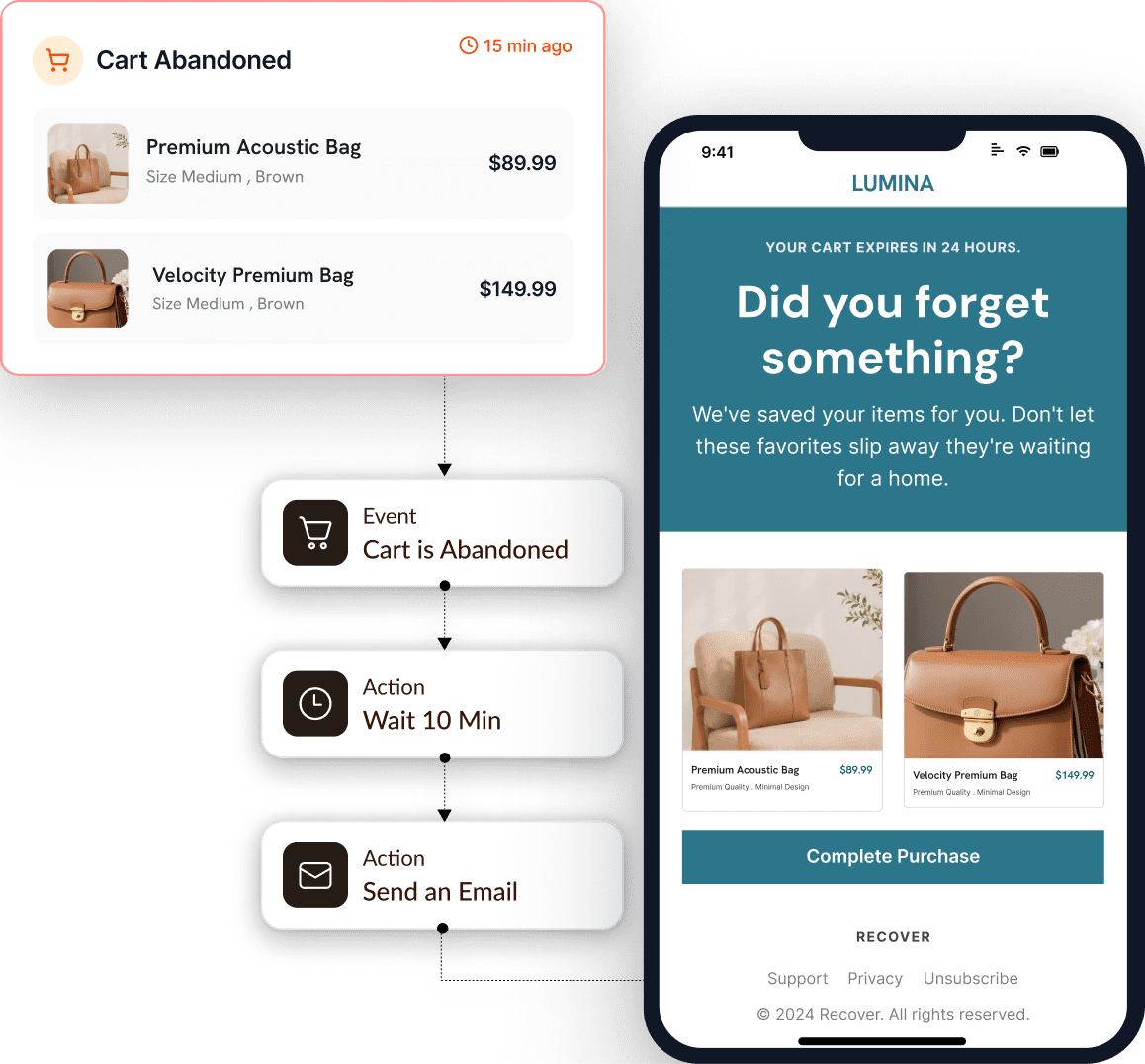
A cart recovery flow and its email in Adflipr.
The Adflipr ecommerce marketing platform also includes popups, campaigns and other automations. For cart recovery:
- Store connection. The Adflipr Shopify app (on the Shopify App Store since January 2026) and the free Adflipr WooCommerce plugin bring in products, coupons, customers and orders.
- Cart capture at checkout. Adflipr captures the cart session the moment a customer enters an email at checkout. Shoppers who never enter one can't be emailed.
- A ready sequence. Adflipr includes a pre-built 3-step sequence spaced over 48 hours, editable in the flow builder.
- Personalized cart emails. The Adflipr cart block shows each shopper's product image, name and variant, quantity, price, shipping, taxes, discount and total, with one "Continue checkout" button and a checkout link unique to that customer.
- Conditions. Adflipr triggers include "Abandoned Cart" and "Cart Recovered", with delays, If/Else conditions and tag steps, so a recovered cart can start a thank-you flow instead of the next reminder.
- Multi-channel steps. Send Email, Send WhatsApp and Send Push run in one Adflipr workflow; WhatsApp reminders show the products left behind with a link back to checkout. See Adflipr's WhatsApp marketing features.
- Analytics. Adflipr reports recovered revenue over time, which email in the sequence brought each shopper back, and which orders came from recovered carts.
Adflipr's Shopify App Store listing shows a free plan (300 emails a month), Standard at $10/month (10,000 emails, unlimited automations) and Premium at $25/month (unlimited sends), checked October 2026. Questions go to support@adflipr.com. More detail: abandoned cart automation with Adflipr, or our overview, What Is Adflipr?
Try Adflipr free and set up your first recovery flow.
Is Adflipr Right for Your Store?
Adflipr fits Shopify and WooCommerce stores that want cart recovery, other automations, popups and campaigns across email, WhatsApp and web push in one tool.
A good fit if you are:
- a Shopify merchant who wants more control than the built-in reminder,
- a WooCommerce merchant who wants recovery flows in a visual flow builder,
- an ecommerce business that wants cart recovery, welcome and post-purchase flows, popups and campaigns in one tool,
- a store that wants automated customer engagement across email, WhatsApp and web push,
- looking for a simpler, lower-cost alternative to larger platforms.
It may not be ideal if you are an enterprise that needs custom customer data infrastructure, or a business outside ecommerce.
Frequently Asked Questions
What is the difference between cart abandonment and checkout abandonment?
Cart abandonment happens before checkout starts; checkout abandonment happens after the shopper starts checkout but before paying. Checkout abandoners have usually typed an email, so they're easier to recover; cart abandoners can be reached only if they're already known.
What is the average cart abandonment rate?
Baymard Institute averages 50 studies to a documented cart abandonment rate of 70.22%, so roughly 7 in 10 carts don't become orders. Rates vary by industry, device and how a store counts carts, so track your own rate over time rather than comparing it with the average.
Can you recover an abandoned cart if the shopper never entered an email?
Not by email or WhatsApp. If the visitor allowed browser notifications, a web push reminder can still reach them. Otherwise, the fix is earlier capture, such as a signup form or an email-first checkout field.
When should I send the first abandoned cart email?
Send the first abandoned cart email 30-60 minutes after abandonment as a starting point. For expensive, considered purchases, 2-4 hours often fits better. Check how often your store syncs data to the email tool, because hourly syncs can delay short timers.
Can WhatsApp be used for abandoned cart recovery?
Yes, for shoppers who gave their phone number and opted in to your WhatsApp messages, as Meta's policy requires. One short reminder usually works better than a sequence. Send it alongside or after the first email, not before.
Can web push recover abandoned carts?
Yes, web push can bring back visitors who allowed browser notifications, even without an email address. It reaches only people who granted permission, and on iPhone and iPad only web apps added to the Home Screen.
How do I stop abandoned cart emails after a customer buys?
Add a purchase check before every message in the workflow, not only at the start. On Shopify, the built-in email is skipped if the customer already bought. In other tools, use a "placed order since starting this flow" condition or an exit trigger such as "Cart Recovered".
How do I measure abandoned cart recovery?
Measure recovered orders and recovered revenue, not opens. Track which message in the sequence brought each shopper back, and compare results when you change one variable, such as the first email's delay. Apple Mail Privacy Protection inflates open rates, so opens are an unreliable signal.
Does Adflipr support abandoned cart recovery on Shopify and WooCommerce?
Yes. Adflipr captures carts when shoppers enter their email at checkout on Shopify and WooCommerce stores, and sends a recovery sequence by email, with WhatsApp and web push available as workflow steps. A pre-built 3-step sequence is included and can be edited.
Abandoned Cart Recovery: Key Takeaways
- Abandoned cart recovery is an automated follow-up that brings back shoppers who left without completing a purchase.
- Recovery reaches only known shoppers: an email or phone number with consent, or a web push subscription.
- Shopify includes a built-in abandoned checkout email in Shopify Messaging; WooCommerce needs an extension or plugin.
- Two or three messages is the usual sequence. Starting points are 30-60 minutes, 12-24 hours and 24-48 hours, then test.
- Every workflow should check for a purchase before each message and stop when the shopper buys.
- Discounts aren't required. Keep them out of the first email and use them only where margins and the shopper's history allow.
- Email carries the sequence; WhatsApp and web push add one reminder each where the shopper has given permission.
- Judge recovery by recovered orders and revenue, not open rates.
If Adflipr sounds like a fit for your store, create a free account and start from the pre-built 3-step cart sequence.
About the author: Kanishak Sharma writes Adflipr's guides on email marketing, marketing automation and SEO for Shopify and WooCommerce stores. More from Kanishak on his Adflipr author page and LinkedIn.


Comments
Post a Comment